Skip to content

by Janice Florent

maze with arrow showing path from entrance to the exit that is on the outside of the maze

Course designs that are not user-friendly can make it very difficult for students to be successful in a course.

Undoubtedly you spent a great deal of time crafting your course content and perfecting your layout, which is why it's crucial to focus on usability. Students have a lot going on in their lives and don’t want to go through a maze-like course; click on dead-end links; have to use too many mouse clicks to get to the content; or scroll through long pages of information.

If you want students to be successful in your online/hybrid course, the course should be intuitive, well organized, and easy to navigate.

In a recent eLearning Industry blog post, Christopher Pappas shared eight tips that can help you create a user-friendly eLearning course for your students. Christopher’s tips are:

  • Provide detailed instructions
  • Keep text short and succinct
  • Opt for brief bursts of information
  • Create an effective course menu
  • Test out your course navigation
  • Integrate supplemental links
  • Include optional tips and tricks that can help students to complete the course

If this has piqued your interest, you can read more in Christopher’s 8 Tips Towards Α User-Friendly eLearning Course blog post for more information.

Image credit: “user friendly” by jflorent is licensed under CC BY 4.0 and is a deravitive of "maze" by naveed.butt licensed under CC BY 2.0

by Karen Nichols

James Lang's recent series in The Chronicle of Higher Education on the small changes that faculty can make to their teaching to improve learning in their courses has been compiled and can now be found on a single page of the Chronicle web site: http://chronicle.com/specialreport/Small-Changes-in-Teaching/44.

His tips include how to spend the first and last 5 minutes of class, how to help students connect your course content with the outside world, giving students some control over their learning plus several other tips.  If you like what you read on the Chronicle page, you may want to read James Lang's book:  Small Teaching: Everyday Lessons from the Science of Learning, was published by Jossey-Bass: http://www.wiley.com/WileyCDA/WileyTitle/productCd-1118944496,miniSiteCd-JBHIGHERED.html.

Finally, the series in the Chronicle ended with an essay, not included on the above page:
http://chronicle.com/article/Small-Changes-or-Big/236839/

Still can't get enough?  Then join the conversation on Twitter at @LangOnCourse or using the hashtag #SmallTeaching.

by Janice Florent

students putting together puzzle pieces leading toward success as a goal

Many students enroll in online classes because of the convenience and flexibility. Some students mistakenly believe taking an online course is going to be easier than a face-to-face class. It is important that students understand online courses require greater responsibility/ownership for their own learning.

In a recent Faculty Focus article, Poonam Kumar, EdD and Marilyn Skrocki, listed a few simple strategies and techniques instructors can do at the course level to support students’ success in online classes. Those strategies and techniques are:

  • Clearly communicate expectations
  • Prepare students
  • Course organization and layout
  • Chunk the content and scaffold instruction
  • Humanize the course

Following these strategies and techniques can help students to succeed in online courses. If this has piqued your interest, you can read more in the Ensuring Student Success in Online Courses article.

Meditation Room

The Center for the Advancement of Teaching and Faculty Development invites you to join us for a regular group meditation. We'll meet each Thursday afternoon throughout the summer of 2016. Drop in when you can.

What to expect?

As the meditation room is located directly beneath the bell tower, we are using the bells in our meditation. They chime quarterly, so our period of silence begins at 12:30 and ends at 12:45.

But I've never done this before!

You needn't have any experience with meditating; just stop by and give it a try. There's no commitment and no pressure.

Why meditate?

Meditation has numerous well-documented benefits, including stress management, improved emotional balance, increased focus and awareness and increased responsiveness to student needs.

  • Date: June 8-August 4, 2016
  • Time: 12:30 - 12:45 PM
  • Location: Meditation Room, St. Katharine Drexel Chapel
  • Sponsor: CAT+FD

Photo credit: Bart Everson

No registration necessary; just join us when you can.

Turnitin has released a major product upgrade that will soon be available with our Blackboard integration. The new version of the service, called Turnitin Feedback Studio, offers all the functionalities of Turnitin, but with a simplified, more intuitive interface.

Turnitin Feedback Studio logo

Turnitin Feedback Studio’s simplified, more intuitive user experience brings together the grading, feedback, and similarity checking services in one view. Additionally, the contextual marking approach of the iPad app allows educators to click anywhere on the paper and leave a comment, QuickMark Comment, or text comment at any time.

Turnitin Feedback Studio will make it faster and easier than ever to promote academic integrity, provide actionable feedback, and evaluate student learning.

Our version of Turnitin is scheduled to be upgraded to Turnitin Feedback Studio in between the summer and fall semesters. Once upgraded, you can expect to see a new interface when you open up a student’s paper in Turnitin. Your students will also experience this new and improved interface when viewing Similarity Reports and receiving feedback.

Want more information?

Try out an interactive demo
Review the Feedback Studio Instructor Guide
Review the Feedback Studio Student Guide
Explore Blackboard’s On Demand Learning Center.
Check out help for instructors at help.blackboard.com.
Try these Blackboard How-To documents.
Visit the Blackboard FAQs for additional blackboard information
or schedule a one-on-one session, email, or
call Janice Florent: (504) 520-7418.

VoiceThread is powerful learning tool that extends the classroom by allowing users to have conversations or discussions around audio and visual media without scheduling a specific time to meet. VoiceThread humanizes interactions in an online environment. VoiceThread can be used to enhance student engagement and online presence.

VoiceThread conversations in the cloud

VoiceThread adds a more personal element to the online experience when utilizing the features of commenting via voice. By hearing and seeing the instructor and classmates during a VoiceThread, a familiarity develops that feeds deeper participation. Utilizing VoiceThreads can give you and your students a "voice."

With VoiceThread, instructors and students can create, share, and comment on media (e.g., images, Microsoft PowerPoint presentations, videos, audio files, documents, PDFs) using a microphone, webcam, text, phone, and audio-file upload.

Additionally, VoiceThread is integrated into our Blackboard system which gives us Single Sign-On authentication and Grade Center integration.

Voicethread is currently available at no cost to Xavier faculty and students.

Want more information?

Explore VoiceThread at XU
Sample VoiceThreads:
Photographs That Changed the World
Visual Thinking
VoiceThread Digital Library
How to Humanize Your Online Class with VoiceThread (free ebook)
Explore Blackboard’s On Demand Learning Center.
Check out help for instructors at help.blackboard.com.
Try these Blackboard How-To documents.
Visit the Blackboard FAQs for additional blackboard information
or schedule a one-on-one session, email, or
call Janice Florent: (504) 520-7418.

by Karen Nichols

Just a quick note about Global Accessibility Awareness Day.  CAT + has posted often on the topic of accessibility and the importance of design features in our courses that benefit ALL learners.  But I think this organization has really good intentions--"The purpose of GAAD is to get people talking, thinking and learning about digital (web, software, mobile, etc.) accessibility and users with different disabilities" so I thought I would share the web address with you.

In 2011 blogger John Devon posted on accessibility issues, especially in technology, and his blog sparked enough interest to create GAAD.

Take a look at their site, join in some of the activities and like them on Facebook if you appreciate their efforts.  Thank you, merci, gracias (their site is not only accessible, but is multi-lingual!).

various accessibility icons

by Janice Florent

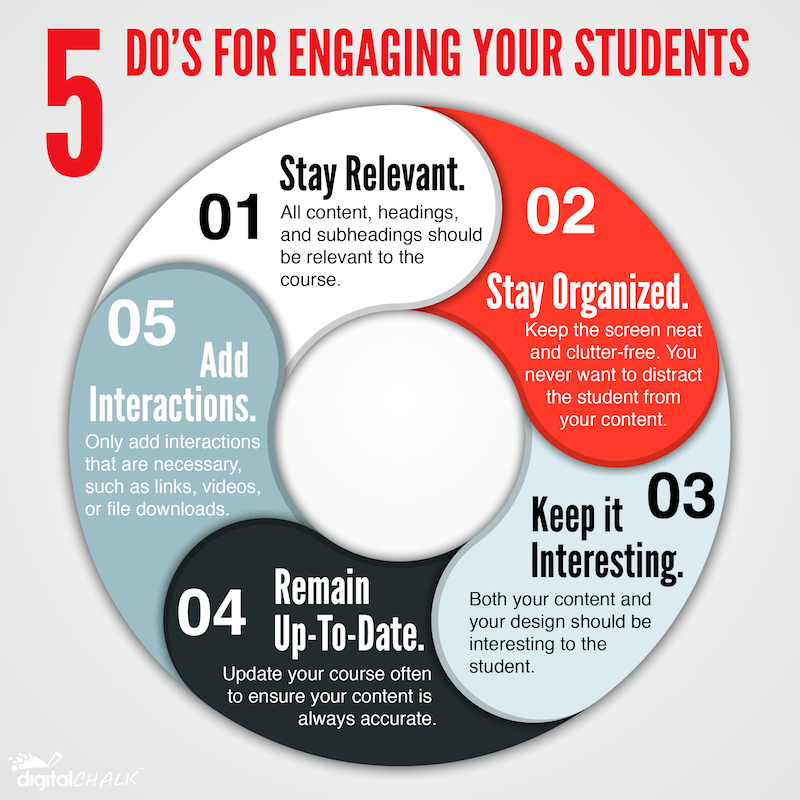
engaging students in eLearning infographic

Engaging students in eLearning can be more challenging than in a face-to-face class. Follow the 5 do's presented in the Engaging Students in eLearning Infographic to create an engaging online course for your students.

5 Tips To Engage Your Students in eLearning

  1. Stay Relevant - All content, heading, and subheading should be relevant to the course.
  2. Stay Organized - Keep the screen neat and clutter-free. You never want to distract the student from your content.
  3. Keep it Interesting - Both your content and your design should be interesting to the student.
  4. Remain Up-To-Date - Update your course often to ensure your content is always accurate.
  5. Add Interactions - Only add interactions that are necessary, such as links, videos, or file downloads.

Reflections

A special issue of the Journal of University Teaching and Learning Practice examines the theme of “Reflection for Learning in Higher Education.”

The journal is online and open access so anyone can read the articles at ro.uow.edu.au/jutlp/

In addition to general approaches to the value of reflection in higher education and experiential learning, articles also cover the role of reflection in science, medical education, psychology, and even accounting.

by Karen Nichols

At last month's OLC Innovate Conference here in New Orleans, I attended many interesting sessions. I found the one on Brainfacts.org particularly useful and would like to share it with you.

The Brainfacts site is the brainchild of the Society for Neuroscience.  According to the presenter, Alissa Ortman, the original intent was to publish correct information in easy to understand language and dispel myths about their field.  The site, which now has numerous partners and contributors, is a safe, reliable resource for you to recommend to your students.  The contributors are all vetted and the information is presented using a variety of tools and platforms and written at about a tenth-grade level.  You can also sign up for their blog, or follow them on Facebook and/or Twitter.

Information for Educators, the Press and Policymakers may be accessed from the top right of the homepage.  The information has been curated into 6 categories in a dropdown format which can be accessed from several different webpages.  They are:  About Neuroscience, Brain Basics, Sensing, Thinking & Behaving, Diseases & Disorders, Across the Lifespan, and In Society.

Here are a few links to give you a sample of the information and formats:

Video:  Why Does Food Make Your Mouth Water?

Podcast: Patient HM and His Missing Memories

Blog:  Zika:  10 Things to Know

I'm following Brainfacts.org on both Facebook and Twitter and I hope you'll find the information interesting and useful too.

coNeCte|BlogdaSociedadeBrasileiradeNeurociênciase