

D2L (the company that owns Brightspace) uses Continuous Delivery to update our Brightspace system. The Continuous Delivery model gives us regular monthly updates allowing for incremental and easily integrated changes with no downtime required for our Brightspace system.
Our Continuous Delivery update occurs on the 4th Thursday of each month. D2L provides release notes to help users stay up-to-date with the changes.
This update from the April 2026/20.26.04 release was added to our system:
1) Quizzes – Improvements to the Quizzes evaluation
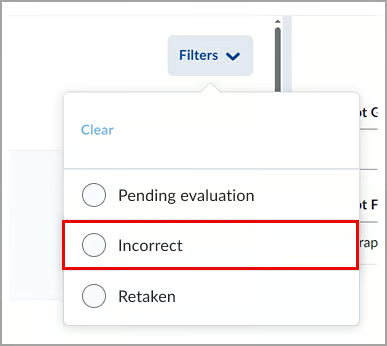
The quiz evaluation experience now includes an Incorrect filter that lets instructors quickly view quickly view answers marked incorrect. In addition, feedback fields automatically expand as needed, providing more space to review and enter feedback.
Instructors can now filter the quiz questions to review only the questions a learner answered incorrectly. This enhancement helps instructors identify trends and determine whether updates to questions or instructional materials are needed.
Previously, the available filters were Pending Evaluation and Retaken questions only. With this update, the new Incorrect filter displays only questions marked incorrect.
Additionally, feedback fields for questions are now displayed as a single line and automatically expand when instructors enter additional comments. Previously, the Feedback field for each question displayed several lines even when no feedback was entered, requiring users to scroll unnecessarily.

This feature implements the following PIE items:
- D1865 (Filter for Viewing only Questions Missed)
- D9123 (Quiz Filter to list only questions that were answered incorrectly)
- D12922 (Quizzes: Filter when marking to only see questions answered incorrectly)
If you are interested in getting more information about this and all the April Continuous Delivery updates, refer to the Brightspace Platform April 2026/20.26.04 Release Notes.
Additionally, refer to the Brightspace Release Notes for Continuous Delivery Releases, for details about current, past, and to preview upcoming continuous delivery updates.
Want more information?
View current, past, and preview upcoming Continuous Delivery release notes
Instructors Quick Start Tutorial
Brightspace Known Issues
Request a sandbox course
Sign-up for Brightspace training sessions
You can find Brightspace help at D2L's website.
Join the Brightspace Community.
Try these Brightspace How-To documents.
Visit our Brightspace FAQs for additional Brightspace information
or schedule a one-on-one session, email, or
call Janice Florent: (504) 520-7418.
Note: Are you doing something innovative in Brightspace or perhaps you've discovered a handy tip? Share how you are using Brightspace in your teaching and learning in The Orange Room.