

D2L (the company that owns Brightspace) uses Continuous Delivery to update our Brightspace system. The Continuous Delivery model gives us regular monthly updates allowing for incremental and easily integrated changes with no downtime required for our Brightspace system.
Our Continuous Delivery update occurs on the 4th Thursday of each month. D2L provides release notes to help users stay up-to-date with the changes.
Here are some of the updates in the September 2026/20.26.09 release were added to our system:
1) Brightspace Editor – Additional heading options
To make creating accessible content easier, the Brightspace Editor now includes Heading 5 and Heading 6 in the Format drop-down menu. Previously, the menu only displayed Heading 1 through Heading 4, and instructors had to use keyboard shortcuts or the Source Code editor to apply the additional heading levels. This update ensures that instructors can easily apply all standard heading levels directly from the Format menu, supporting compliance with accessibility standards.


This feature implements the following PIE item:
- D13831 (Add H5 and H6 to 'format' dropdown)
2) Groups – Bulk edit group names and codes
To improve efficiency when managing large numbers of groups, the new Manage Groups experience now allows instructors to bulk edit group names and codes within a category. Previously, instructors had to select each group individually to edit its details. Instructors can now click Edit Group Names to update the names and codes for one, multiple, or all groups from a single interface, saving time and reducing administrative effort.


3) Work To Do widget – Dismiss overdue items
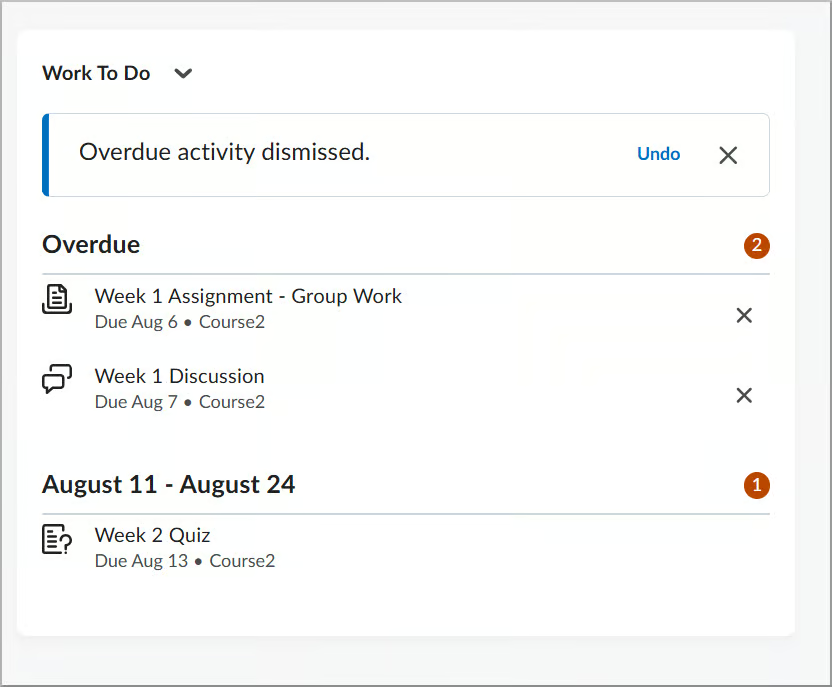
To help learners better manage their workload, the Work To Do widget now allows users to dismiss overdue activities. Previously, overdue items remained on the list until completed or their due dates were removed, potentially cluttering lists for courses without end dates or those that remained active after completion.
Now, learners with the appropriate permission can select the X icon next to an overdue activity to remove it from their view. After dismissing an activity, an alert appears briefly with an Undo option, allowing learners to restore the activity if it was dismissed by mistake.

This feature implements the following PIE item:
- D12110 (Provide students the ability to dismiss overdue notifications from previous semester courses)
If you are interested in getting more information about this and all the September Continuous Delivery updates, refer to the Brightspace Platform September 2026/20.26.09 Release Notes.
Additionally, refer to the Brightspace Release Notes for Continuous Delivery Releases, for details about current, past, and to preview upcoming continuous delivery updates.
Want more information?
View current, past, and preview upcoming Continuous Delivery release notes
Instructors Quick Start Tutorial
Brightspace Known Issues
Request a sandbox course
Sign-up for Brightspace training sessions
You can find Brightspace help at D2L's website.
Join the Brightspace Community.
Try these Brightspace How-To documents.
Visit our Brightspace FAQs for additional Brightspace information
or schedule a one-on-one session, email, or
call Janice Florent: (504) 520-7418.
Note: Are you doing something innovative in Brightspace or perhaps you've discovered a handy tip? Share how you are using Brightspace in your teaching and learning in The Orange Room.